One account, six sites
One email, one password, one profile on all six Tradexus sites — with a separate signed-in session on each.
On this page
#What one account means
All six sites run the same account code against the same account database. The email and password you choose on any of them work on every other one, and everything that belongs to the account — your name, picture, member number, saved wallets, Arcade XP, prizes — is the same wherever you look at it.
What is not shared is the signed-in session. Each site keeps its own session cookie for its own address, so signing in on Launchpad does not sign you in on Stream: you sign in once per site, with the same details. Signing out works the same way, one site at a time.
| Item | Where it lives |
|---|---|
| Shared on every site | Email and password · display name · profile picture · member number and join date · confirmed-email status · wallets · Arcade profile (XP, level, streak, badges) · prizes from Spin & win |
| Kept per site | The signed-in session (a session cookie for that site only) · the light/dark choice · consent choices in Cookie settings |
| Kept in your browser only | A watchlist saved before you sign in · swaps you opened · a few display preferences (local storage) |
#Create your account
- Open any Tradexus site and choose Sign in (the person icon at the top right; on phones, in the menu).
- Choose “Create account” and enter your email and a password of at least 8 characters. A display name is optional (up to 40 characters) — without one, the part of your email before the @ is used, and public boards hide most of it.
- Confirm your email with the link we send. The link works for 7 days; only the newest link works, and you can ask for a new one once a minute.
- You’re in on that site. On any other Tradexus site, sign in with the same email and password.
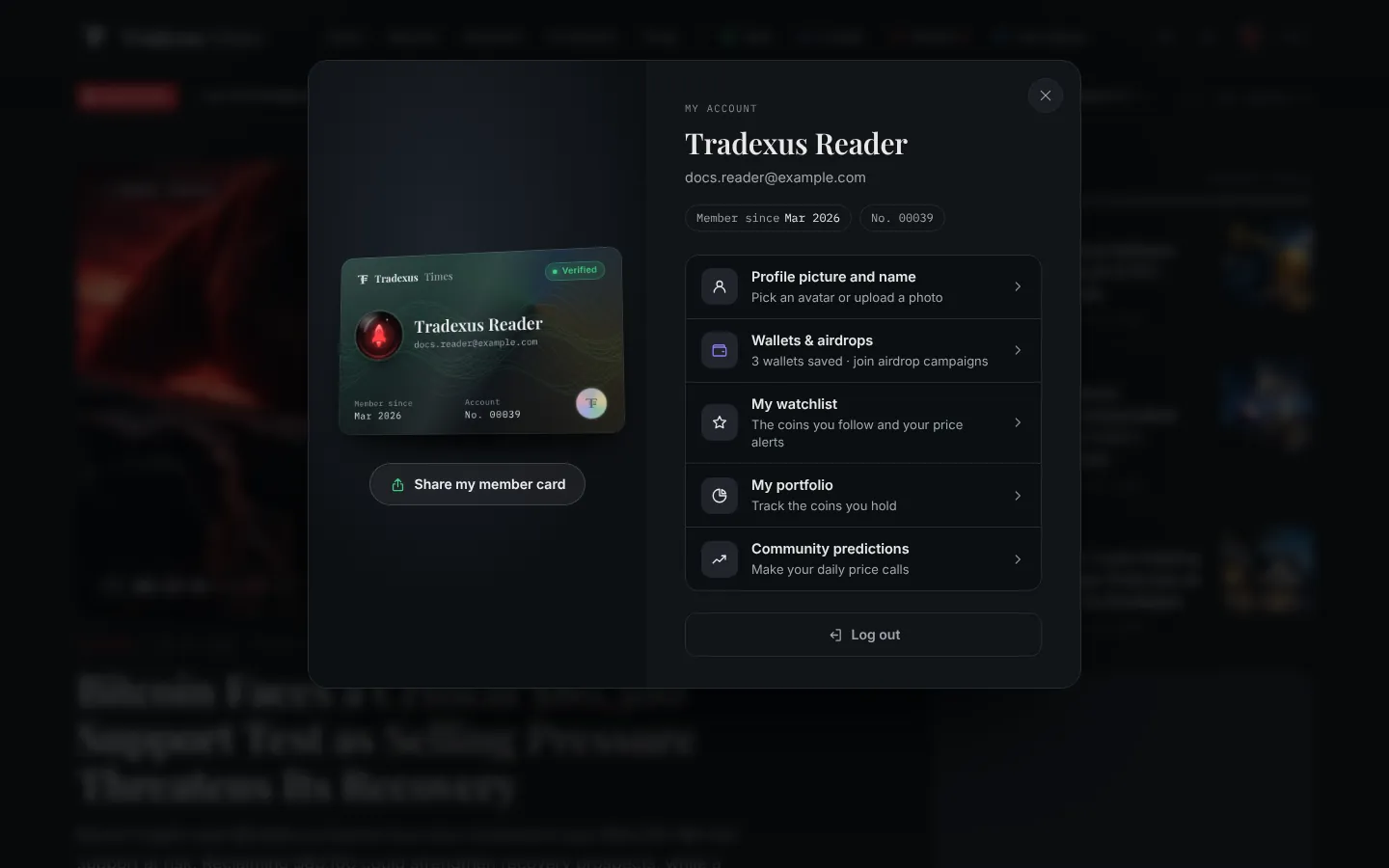
#The account window
The account button opens the same window on every site, in that site’s colours. It holds:
- Your card — picture, display name, member number (shown as “No. 00042”) and the month you joined. The card can be downloaded as an image to share.
- Picture — choose one of 36 ready-made avatars in six styles (Minted, Glass, Spectra, Neon, Terminal, Gems) or upload a photo.
- Name — change your display name at any time.
- Wallets & airdrops — public addresses for rewards (see Wallets and airdrops).
- Shortcuts to the features of the site you are on: watchlist, alerts, predictions and portfolio on Tradexus Times; the token-sale watchlist on Launchpad; your profile on Arcade; prizes from Spin & win.
#Profile pictures
An uploaded photo is cropped to a square, resized to 256 × 256 pixels and re-saved as WebP, which strips every hidden detail in the original file (location, camera, dates). Before anyone else can see it, an automatic moderation check looks at it; when that check is unsure, a person on our team decides. While it waits you already see it on your own card; everyone else sees your chosen avatar until it is approved. Members can report a picture, and you can switch back to an avatar at any time.
#Passwords and email
- Forgot your password? Choose “Forgot password” in the sign-in window; if the email has an account, we send a reset link that works for 1 hour. The answer on screen is the same whether or not the email is registered, so nobody can use the form to find out who has an account.
- Typed your email wrong? Until the account is confirmed, the “Confirm your email” card lets you correct the address and sends the link there. A confirmed address can be changed by writing to support from that address.
- Passwords are stored as one-way hashes; nobody at Tradexus can read yours, and we will never ask for it.
- Repeated wrong passwords lock sign-in for a while, to stop guessing.
#Delete your account
Email support@tradexustimes.com from the address on the account. Deleting removes the account and what belongs to it — profile, picture, watchlist, portfolio, alerts, wallets and the Arcade profile — on all six sites at once, because they share the one record.